Thermo Utilities v3.0 is a software package developed for engineers and scientists who wish to design, analyze or optimize power plants, air conditioning systems and other chemical processes. It supports MS Excel 7.0 and higher and it will run on PC platforms with operating systems Win 95, Win 98, Win NT 3.51 and higher.
Thermo Utilities offers a large number of functions for calculating the properties of water, steam, air, flue gases and other fluids. The functions used for steam and water properties are based on a set of equations accepted by the members of the Sixth International Conference on the Properties of Steam. The sets of equations are also known as "IFC Formulation for Industrial Use". Thermo Utilities calculates the properties of dry air, moist air, exhaust and flue gases by using equations accepted by ASHRAE and CIBSE (Chartered Institute of Building Services Engineers). Lee-Kesler method used in this package can be applied to a large number of chemicals for estimating thermodynamic properties. The database accompanied with this package for use with Lee-Kesler method supports more than 450 chemicals. The package also offers a large number of inverse functions which are useful for applied thermodynamics calculations. The features are:
Download the latest version, about 1.75 Mb
There is also a number of worksheets available for registered users. These worksheets cover combustion of coal, biomass and fossil fuel, compressor, condenser design, cooling with dehumidification, closed-feed heaters, gas turbine, mixing of two air streams, regenerative steam cycle, sensible cooling/heating process, steam turbine and steam valve/throttling process.
The instructions below are also available as a PDF file ready for printing, click here to download. You must have approximately 2.7 Mb of free disk space to install the program. Before you install "Thermo Utilities":
The installation procedure is as follows:

For doing this, click on Windows "start" button, select "Program" then select "Thermo Utilities" folder and then right click with mouse, select properties, select security, among the following options for the user (Full Control, Modify, Read & Execute, Read & Write) select "Full Control" and push "OK" button. The following instructions are Windows Vista only:

The unit conversion will apply to both inputs and outputs. If you activate "UNIT.XLA", you can use the strings for the current unit in your worksheet, which improves the readability and security of your calculations. It should be mentioned that Cv, specific heat capacity at constant volume has the same unit as Cp. Steam quality or dryness fraction and Gamma are dimensionless parameters.
In order to activate steam/water functions in MS Excel perform the following procedure:
Then browse C:\THERMOXL\STMXL.XLA
For air and flue gas functions browse C:\THERMOXL\AIRXL.XLA
For Lee-Kesler method functions browse C:\THERMOXL\LKXL.XLA
For unit conversion function browse C:\THERMOXL\UNIT.XLA
You can deactivate any of these groups of functions by deselecting them.
When you activate STMXL.XLA, you have access to all steam/water functions. By pressing fx button in MS Excel a dialog over all function comes up. Select "User Defined" and you will have a list over all user defined functions. When you pick a function, a brief description of the function appears at the bottom of the dialog box. If you press "Next", Excel will continue with a dialog box that asks for the necessary inputs for the function. In case, you press "Enter" button, you should fill all the parameters with numbers, cell reference, variable name and so on. These are the normal Excel functions behavior and is not specific for this program. If you need more help please see the on-line help of MS Excel or the user manual. The function names are compatible with the DLL version of steam properties. Those users who upgrade to this version from DLL version of steam properties will find several new functions. There are some simple rules that will help you to remind function names. Here, you have a complete list of functions for properties of steam and water. A print of this page will be helpful if you are new to this package.
|
Function |
Description |
Comment |
|
STMCp |
(P,T)-->Cp, Heat capacity |
. |
|
STMCpSS |
(P)-->Cp for saturated steam |
. |
|
STMCpSW |
(P)-->Cp for saturated water |
. |
|
STMDv |
(V,T)-->Dv, Dynamic viscosity |
. |
|
STMPHQ |
(P,H)-->Q, Dryness fraction |
. |
|
STMPHS |
(P,H)-->S, Specific entropy |
. |
|
STMPHT |
(P,H)-->T, Temperature |
. |
|
STMPHV |
(P,H)-->V, Specific volume |
. |
|
STMPQH |
(P,Q)-->H, Specific enthalpy |
. |
|
STMPQS |
(P,Q)-->S |
. |
|
STMPQV |
(P,Q)-->V |
. |
|
STMPSH |
(P,S)-->H |
. |
|
STMPSQ |
(P,S)-->Q |
. |
|
STMPST |
(P,S)-->T |
. |
|
STMPSV |
(P,S)-->V |
. |
|
STMPT |
(P)-->T, Saturation temperature |
Should work in demo version |
|
STMPTH |
(P,T)-->H |
. |
|
STMPTS |
(P,T)-->S |
. |
|
STMPTV |
(P,T)-->V |
. |
|
STMPVH |
(P,V)-->H |
. |
|
STMPVQ |
(P,V)-->Q |
. |
|
STMPVS |
(P,V)-->S |
. |
|
STMPVT |
(P,V)-->T |
. |
|
STMTc |
(V,T)-->Tc, Thermal conductivity |
. |
|
STMTP |
(T)-->P, Saturation pressure |
Should work in demo version |
|
STMTQH |
(T,Q)-->H |
. |
|
STMTQS |
(T,Q)-->S |
. |
|
STMTQV |
(T,Q)-->V |
. |
Functions for properties of air/flue gases are based on equations accepted by ASHRAE and are compatible with formulations accepted by CIBSE (Chartered Institute of Building Services Engineers). When you activate AIRXL.XLA, you have access to all air/flue gases functions. By pressing button fx in MS Excel a dialog over all function comes up. Select "User Defined" and you will have a list over all user defined functions. When you pick a function, a brief description of the function appears at the bottom of the dialog box. If you press "Next", Excel will continue with a dialog box that asks for the necessary inputs for the function. In case, you press "Enter" button, you should fill all the parameters with numbers, cell reference, variable name and so on. These are the normal Excel functions behavior and is not specific for this program. If you need more help please see the on-line help of MS Excel or the user manual. The function names are compatible with the DLL version of Air and Exhaust Gas properties. Those users who upgrade to this version from DLL version of Air and Exhaust Gas will find several new functions. There are some simple rules that will help you to remind function names. Here, you have a complete list of functions for properties of Air and Exhaust Gas. A print of this page will be helpful if you are new to this package.
|
Function |
Description |
Comment |
|
AirCpT |
(mc,Cp)-->T, Temperature |
. |
|
AirDpt |
(mc,P)--> Dpt, Dew point temperature |
. |
|
AirDv |
(mc,P,T)-->Dv, Dynamic viscosity |
. |
|
AirGC |
(mc)-->Gc, Gas constant |
Should work in demo version |
|
AirHT |
(mc,H)-->T |
. |
|
AirMM |
(mc)-->Mm, Molecular mass |
Should work in demo version |
|
AirST |
(mc,S)-->T |
. |
|
AirTc |
(mc,P,T)-->Tc, Thermal conductivity |
. |
|
AirTCp |
(mc,T)-->Cp, Heat capacity at constant P |
. |
|
AirTCv |
(mc,T)-->Cv, Heat capacity at constant V |
. |
|
AirTGamma |
(mc,T)-->Gamma = Cp/Cv |
. |
|
AirTH |
(mc,T)-->H, Specific enthalpy |
. |
|
AirTS |
(mc,T)-->S, Specific entropy |
. |
|
FlueCpT |
(Cp,%)-->T, Temperature |
. |
|
FlueDpt |
(P,%)--> Dpt, Dew point temperature |
. |
|
FlueDv |
(P,T,%)-->Dv, Dynamic viscosity |
. |
|
FlueGC |
(%)-->Gc, Gas constant |
Should work in demo version |
|
FlueHT |
(H,%)-->T |
. |
|
FlueMM |
(%)-->Mm, Molecular mass |
Should work in demo version |
|
FlueST |
(S,%)-->T |
. |
|
FlueTc |
(P,T,%)-->Tc, Thermal conductivity |
. |
|
FlueTCp |
(T,%)-->Cp, Heat capacity at constant P |
. |
|
FlueTCv |
(T,%)-->Cv, Heat capacity at constant V |
. |
|
FlueTGamma |
(T,%)-->Gamma = Cp/Cv |
. |
|
FlueTH |
(T,%)-->H, Specific enthalpy |
. |
|
FlueTS |
(T,%)-->S, Specific entropy |
. |
|
GasDensity |
(P,T,Gc)-->Ro, Density |
Should work in demo version |
|
GasS |
(P,Gc,Satm)-->S at pressure, P |
Should work in demo version |
|
GasSAtm |
(P,Gc,S)-->Satm = S at atmospheric pressure |
Should work in demo version |
|
ScreenPS |
(DBT,WBT)-->PS, Percentage saturation |
. |
|
ScreenRH |
(DBT,WBT)-->RH, Relative humidity |
. |
|
ScreenSH |
(DBT,WBT)-->SH, Specific humidity |
. |
|
ScreenVWR |
(DBT,WBT)-->VWR, Volumetric water ratio |
. |
|
SlingPS |
(DBT,WBT)-->PS, Percentage saturation |
. |
|
SlingRH |
(DBT,WBT)-->RH, Relative humidity |
. |
|
SlingSH |
(DBT,WBT)-->SH, Specific humidity |
. |
|
SlingVWR |
(DBT,WBT)-->VWR, Volumetric water ratio |
. |
The current version of Lee-Kesler method support 467 different chemical compounds. You can use the utility software "fluidpro.exe" to view, edit or add new entries to our database. When you edit or add new entries, you should use the units mentioned in ellipses below. This limitation apply only to database entry, our software will use the default unit for input/output as you selected by "setunit.exe" as described before. The database supports the following:
A word of caution, in case you add/remove entries in the middle of database, the fluid index will be changed. Here is a screenshot of "fluidpro.exe".

These functions compute the thermodynamic properties of chemicals by using reduced pressure and temperature. When you activate LKXL.XLA, you have access to these functions. By pressing fx button in MS Excel a dialog over all function comes up. Select "User Defined" and you will have a list over all user defined functions. When you pick a function, a brief description of the function appears at the bottom of the dialog box. If you press "Next", Excel will continue with a dialog box that asks for the necessary inputs for the function. In case, you press "Enter" button, you should fill all the parameters with numbers, cell reference, variable name and so on. These are the normal Excel functions behavior and is not specific for this program. If you need more help please see the on-line help of MS Excel or the user manual. The function names are compatible with the DLL version of steam properties. Those users who upgrade to this version from DLL version of steam properties will find several new functions. There are some simple rules that will help you to remind function names. Here, you have a complete list of functions. A print of this page will be helpful if you are new to this package.
|
Function |
Description |
Comment |
|
FluidIndex |
Fluid index in DB |
Should work in demo version |
|
DBTfb |
Normal freezing point |
Should work in demo version |
|
DBTb |
Norma boiling point |
Should work in demo version |
|
DBTc |
Critical temperature |
Should work in demo version |
|
DBPc |
Critical pressure |
Should work in demo version |
|
DBVc |
Critical specific volume |
Should work in demo version |
|
DBZc |
Critical compressibility factor |
Should work in demo version |
|
DBAF |
Pitzer's acentric factor |
Should work in demo version |
|
DBDM |
Dipole moment |
Should work in demo version |
|
DBDELHF |
Standard enthalpy of formation |
Should work in demo version |
|
DBDELGF |
Standard Gibbs energy of formation |
Should work in demo version |
|
LKPFT |
(P,F)->T, reduced temperature |
. |
|
LKPHT |
(P,H)->T, reduced temperature |
. |
|
LKPQF |
(P,Q)->F, fugacity-pressure ratio |
. |
|
LKPQH |
(P,Q)->H, residual enthalpy |
. |
|
LKPQS |
(P,Q)->S, residual entropy |
. |
|
LKPQZ |
(P,Q)->Z, compressibility factor |
. |
|
LKPST |
(P,S)->T, reduced temperature |
. |
|
LKPZT |
(P,Z)->T, reduced temperature |
. |
|
LKPT |
(P)->T, reduced saturation temperature |
Should work in demo version |
|
LKPTF |
(P,T)->F, fugacity-pressure ratio |
. |
|
LKPTH |
(P,T)->H, residual enthalpy |
. |
|
LKPTS |
(P,T)->S, residual entropy |
. |
|
LKPTZ |
(P,T)->Z, compressibility factor |
. |
|
LKTP |
(T)->P, reduced saturation pressure |
. |
|
LKTQF |
(T,Q)->F, fugacity-pressure ratio |
. |
|
LKTQH |
(T,Q)->H, residual enthalpy |
. |
|
LKTQS |
(T,Q)->S, residual entropy |
. |
|
LKTQZ |
(T,Q)->Z, compressibility factor |
. |
All functions for steam/water properties start with STM then comes abbreviations for inputs needed and at last the output. Some examples are STMPTH needs P, pressure and T, temperature and calculates H, specific enthalpy, STMPHT needs P, pressure and H, specific enthalpy and calculates T, temperature. The same rule applies to functions for dry air, moist air and flue gases. Functions for dry and moist air start with Air and functions for flue gases start with Flue. All functions for dry/moist air need mc, moisture content. Therefore it has been omitted from the function's name. The same is with the flue gas functions all of them need the volumetric or mole fraction of the gases. Functions for screen hygrometer start with Screen and functions for sling hygrometer start with Sling . These functions calculate SH, specific humidity, RH, relative humidity, PS, percentage saturation and VWR, volumetric water ratio.
Molecular weight of any compound can be computed by using its chemical formula.
You can view our function prototypes and VBA interface by selecting "Tool", "Macro", "Visual Basic Editor" in Excel. By developing your own macros you can speed up your calculations and also make your own dialog boxes for input/output.
All functions return large negative numbers in case of error. No function returns a negative number less than -1000 no matter what units are used. The returned values and reasons are:
0.01 bar < P < 1000 bar
0 C < T < 800 C
0.0= < Q < = 1.0
P <= 221.0 bar
T <= 374.0 C
All functions return large negative numbers in case of error. No function returns a negative number less than -20E+9 no matter what units are used. The returned values and reasons are:
0 =< mc < 0.30
-40 C < T < 1500 C
-40 C < T < 70 C
DryBulbT >= WetBulbT
All functions return large negative numbers in case of error. No function returns a negative number less than -2000. No matter what units are used. The returned values and reasons are:
0.01 < Pr < 10
Pr = Reduced pressure = P/Pcr
Pcr = Critical pressure
P = Pressure
0.3 < Tr < 4.0
Tr = Reduced temperature = T/Tcr
Tcr = Critical temperature
T = Temperature
0.0= < Q < = 1.0
Pr < = 1.0
Tr < = 1.0
Z = ( V * P ) / ( R * T )
V = Specific volume
R = Gas Constant = 8.3144 J/(mol.K) = 10.732 psia.ft2/(lb-mol.R)
-0.5 < Af < 2.0
The above function description and error handling is also available as a PDF file ready for printing, click here to download.
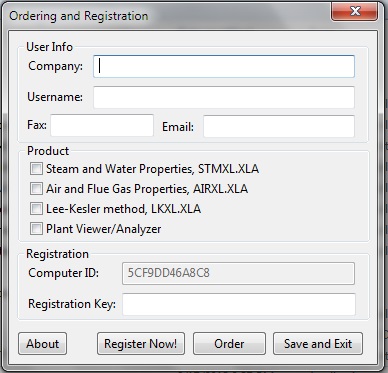
Before ordering your registration key, please check that everything works on your computer. Many functions of Thermo Utilities v3.0 should work even if you do not have a registration key. If there is any problem, do not hesitate to contact us. We solve all the problems, before you order our product. When you order you will receive your registration key that enables all the functions. It is not possible to transfer the registration key from one computer to other. As a registered user you will receive to registration keys per each license you order. Or in other words for every license you order we issue one free license for the same software for backup purposes. You can order the extra license at any time. Some customers use this when they upgrade the computer/OS. Some others install one copy as a backup on a desktop at the office and use the other on a laptop in the field. You decide how you would like to use the extra license. If you wish to order your registration key, please run the program register.exe and:
Here is a screenshot of registration utility:

The prices of the registration keys are:
Please click on the link to order.
![]()